
Brussels Import
With Brussels Airlines you connect FollowMe once to the calendar feed from the Blue One MyCrew app. After that your roster stays up to date by itself.
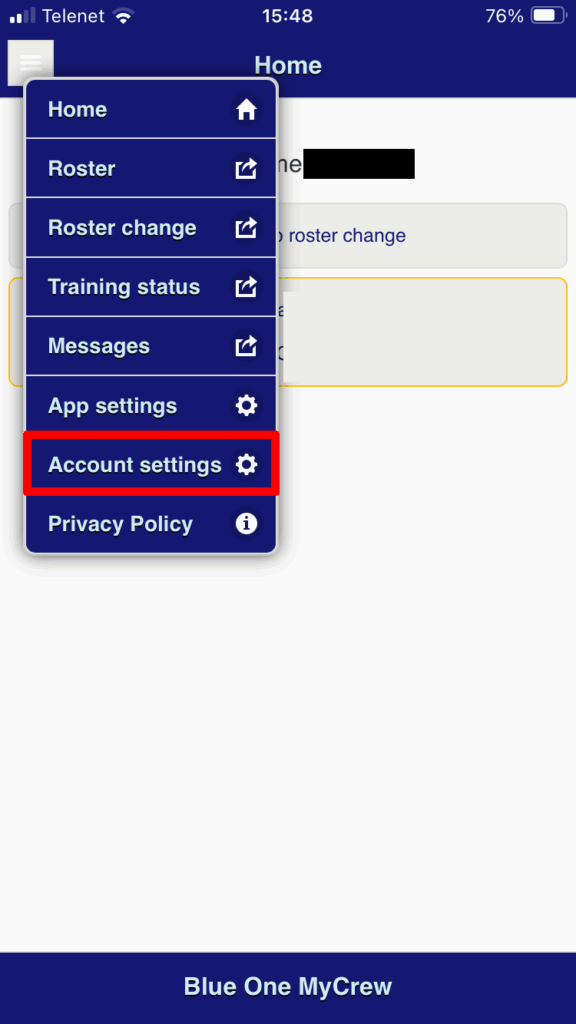
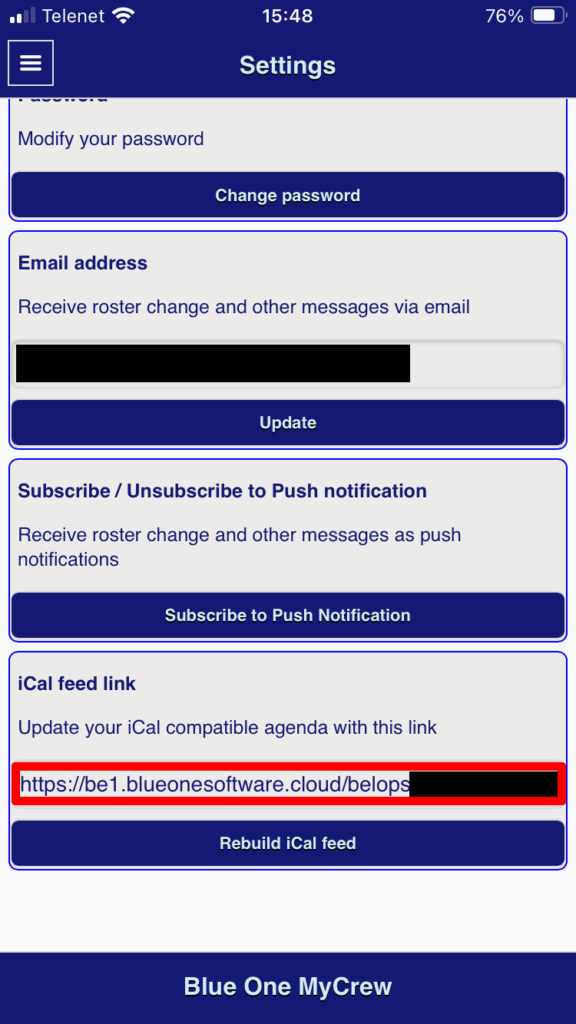
- Open the Blue One MyCrew app, tap the menu at the top left and then Account settings. Copy the link under iCal feed link, it starts with
https://be1.blueonesoftware.cloud/. Use this link, not the one from Hypernix: that one does not work. - Open FollowMe and go to Menu › Import.
- Choose Calendar feed as the import method and paste the link.
- Tap Import.
From now on FollowMe picks up changes automatically and sends you a push notification. To check right away, open the menu and tap Sync at the bottom.
Not working?
- Check that your trial or subscription is still running: Menu › Inapp-Purchase.
- Did you use the link from Hypernix? It does not work. Use the link from Blue One MyCrew.
- Did you choose Calendar feed and not Calendar?
- Did you create a new link? Then paste the new one under Menu › Import.